How to Create a Temu Account Without Your Personal Phone Number
Create a Temu account with email, review optional SMS rental limits, and keep account access separate from the contact details needed for delivery.
You can start a Temu account with an email address instead of your personal phone number. Temu’s account-creation help lists email, phone and supported third-party sign-in options. Start with email if keeping your main number out of registration is your goal. A temporary SMS number is an optional route to assess, not a prerequisite or a guarantee of acceptance.
TL;DR
- Try Temu’s email registration option first. You can skip the optional VerifyNumber setup below if you do not need SMS.
- If you choose a separate number, review its eligibility, cost and expiry before requesting a code.
- Account login and delivery contact details serve different purposes. Use a reachable contact for an order.
- Keep a sign-in method you control beyond the rental window. A temporary number is not a permanent recovery line.
Why Separate Your Temu Login From Your Personal Number?
An email signup lets you keep shopping correspondence in an inbox you choose without volunteering your everyday mobile number as the login identifier. It is a useful starting point for someone who wants fewer accounts tied to the same number.
That choice does not make shopping anonymous. Temu’s US privacy policy distinguishes account credentials from order information, including shipping addresses, payment details and recipient contact information. Email registration therefore does not establish that you can complete every later checkout or security check without a phone number.
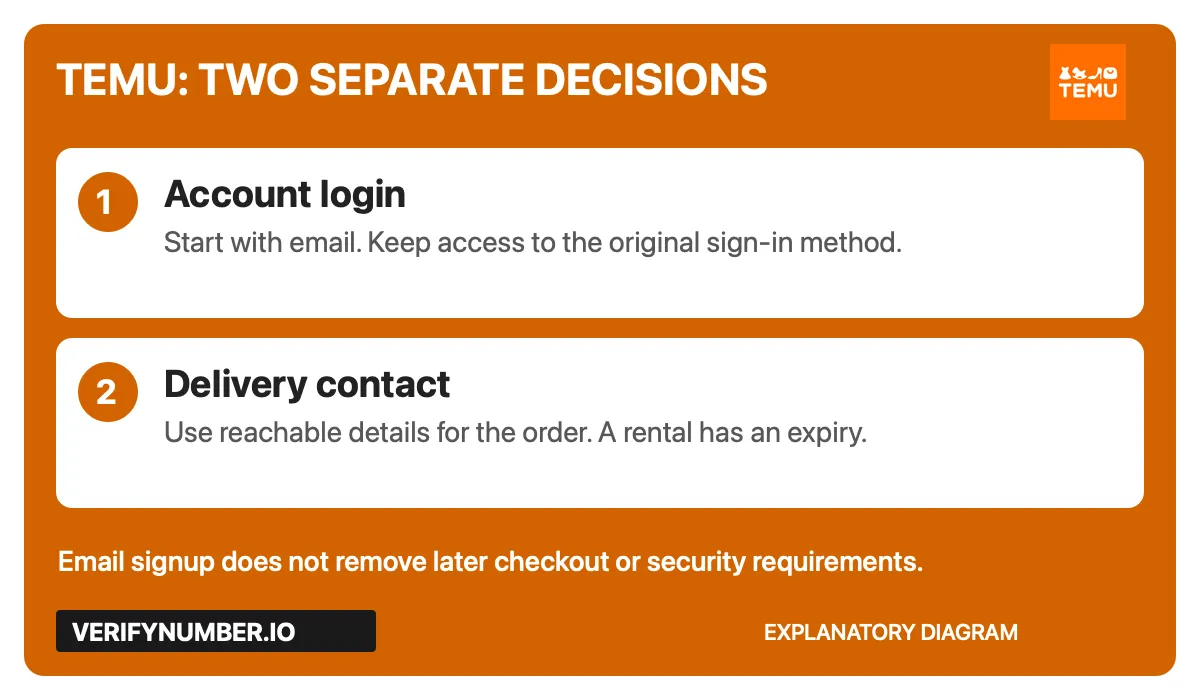
Explanatory diagram: choose a lasting login method, then provide reachable delivery details when required. This is not a Temu interface screenshot.
Before spending anything: decide whether email already meets your need. The next three steps describe optional VerifyNumber preparation. Readers using email or an existing suitable line can go directly to Step 4.
Step 1: Access Your VerifyNumber Account, If Needed
Open VerifyNumber and follow the account-access prompts. Existing customers can use their account. Find New Verification to review rental options; My Numbers is the place to check numbers associated with your account.
VerifyNumber navigation captured November 4, 2026. Reused from the existing dashboard screenshots; labels may change.
Step 2: Review the Rental Cost and Your Wallet
For an SMS rental, review the amount currently shown before adding money. The dashboard capture shows Top up wallet. Add funds only if the chosen rental needs them and you want to proceed. Email registration does not require this step.

Wallet entry point captured November 4, 2026. No payment or top-up was performed for this guide.
VerifyNumber’s support page says rentals are paid from the wallet before assignment. Check the current checkout and terms for charges; contact support if the information shown is unclear. This guide does not promise a minimum deposit, automatic refund or successful Temu verification.
Step 3: Review the OTP Options and Rental Duration
The saved New Verification screen contains a What are you verifying? selector showing OTP, duration choices and Get Number. Review the options actually available in your account. The capture does not establish that a Temu-specific service is offered.
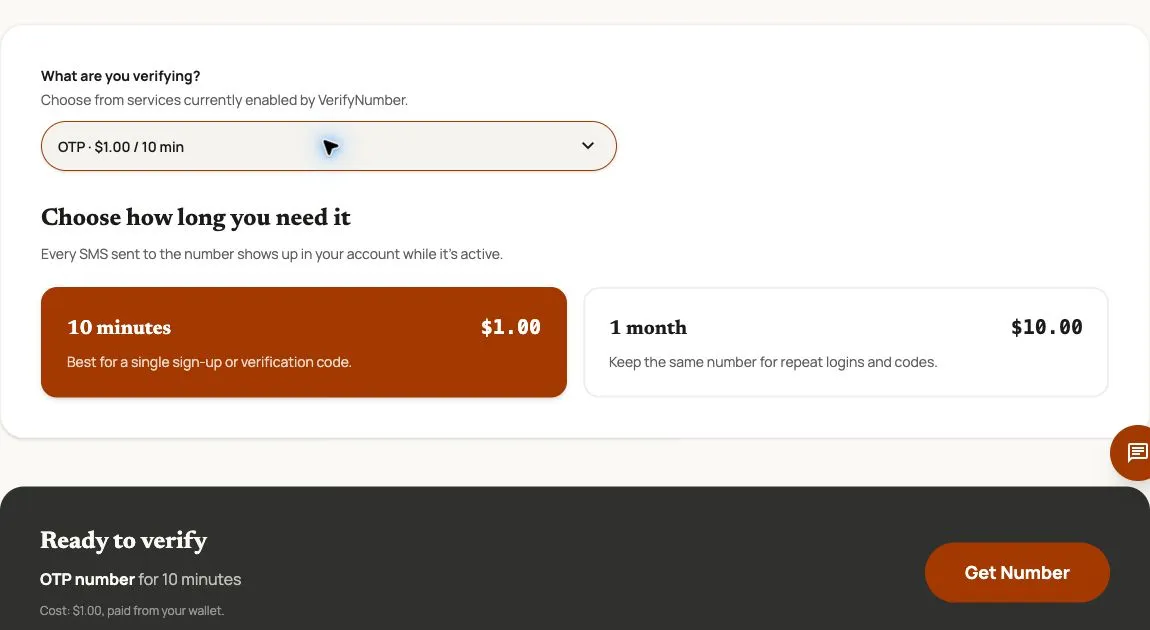
Actual controls captured November 4, 2026. Prices are dated examples. This image does not demonstrate Temu acceptance or code delivery.
If you proceed, confirm the assigned number and active rental window in My Numbers before requesting an SMS. The image shows 10-minute and one-month choices; neither is permanent ownership. VerifyNumber’s terms describe limited assignments, possible reassignment and no guarantee that a third-party platform will accept a number.
For an account you intend to keep, prioritize a contact method you can retain. If Temu requires continuing access to a number, choose a suitable lasting line or ask Temu support about its available options before renting.
Step 4: Create Your Temu Account With Email
Use Temu’s documented email route first:
- Open the official Temu app or Temu website.
- Open Sign in/Register. On the website, Temu’s help places it at the upper right.
- Review the terms and privacy information presented for your region.
- Choose email registration, enter an address you control and complete the prompts shown. If asked to create a password, use a unique one.
Temu also documents sign-in through supported third-party accounts. Choose that route only if you want the connection and can keep access to the linked account. The available buttons and checks may differ by region or app version; follow your actual screen.
If your chosen flow asks for SMS: inspect the number and country-code requirements before entering a separate number. Request a code only for your own account and only while you can receive it. If a message arrives in your active rental, enter it in the Temu prompt that requested it. Do not assume paying for a rental makes the number eligible. No Temu signup or SMS delivery was tested for this guide.
Step 5: Keep Login and Delivery Details Usable
Record which method you used to create the account. Temu’s sign-in troubleshooting says to check the original email, number or authentication method; accounts created through a third-party login should use that method again. Avoid treating a different login option as a shortcut back to an existing account.
Before placing an order, check these two things separately:
- Account access: can you still use the email inbox or linked sign-in account? If a temporary number is attached, check Temu’s available account settings while you still control it. Do not assume an email address automatically removes every future phone check.
- Delivery contact: can the recipient actually be reached through the contact details supplied for the order? An expiring SMS inbox is a poor choice for a delivery that may happen later. VerifyNumber’s terms do not describe its rentals as a voice-calling service.
Temu’s privacy policy also describes marketing controls in Notifications. Review those preferences directly if reducing promotional messages is your main aim; changing a login identifier is not a substitute for choosing notification settings.
If Signup or a Verification Code Gets Stuck
Check the destination shown in the prompt first: an email code belongs in the email inbox, while an SMS goes to the listed number. For SMS, confirm the country code, digits and remaining rental time. Follow any on-screen retry timer instead of repeatedly requesting codes.
For a rejected number or account-specific restriction, use Temu’s Support Center. A replacement rental is not a guaranteed fix. For rental or wallet questions, use VerifyNumber support.
Our guides to checking a missing SMS code before resending and what phone verification actually proves explain the delivery and ownership questions behind these checks.
VerifyNumber Compared With Free Temu Signup Options
The most useful free alternative is Temu’s own email signup. A public SMS inbox is a different proposition: if its messages are publicly visible, it is unsuitable for keeping an account’s verification codes private.
| Option | When it can fit | What to check |
|---|---|---|
| Temu email signup | Keeping your main number out of initial registration | Keep the inbox accessible; later checks and checkout details are separate. |
| Supported third-party login | Using an account you already maintain | Keep access to that original provider and review the connection. |
| Public SMS inbox | Poor fit for a personal shopping account | Public messages and uncertain number control undermine reliable access. |
| VerifyNumber rental | A permitted SMS task with a finite receiving window | Check current cost, number eligibility and expiry. Temu acceptance is not guaranteed. |
Additional Benefits of Using VerifyNumber for Temu Setup
A visible rental choice. The saved dashboard shows duration options before Get Number, giving you a concrete expiry decision to make before requesting an SMS.
A place to manage the rental. My Numbers and History provide account navigation for reviewing your use. These controls do not establish permanent control of a number.
Help with the provider side. VerifyNumber’s support team can review rental or wallet issues and help with next steps. Temu remains responsible for its account decisions. If email signup meets your needs, there is no reason to buy a number just to follow this guide.
Wrapping Up
Start with Temu’s email option and keep that login method accessible. If you have a suitable SMS-only task, review your VerifyNumber account, wallet and rental duration before using a separate number. Keep delivery contact details and long-term account access in mind throughout.
Need a separate SMS number? Review your options with VerifyNumber before renting. For help with a rental or charge, visit Support or email support@verifynumber.io. The team will review the issue and help you with next steps.