How to Set Up an X Account Without Your Personal Phone Number
Set up X with email when offered, assess separate SMS access if needed, and review discoverability, authentication and future account access before relying on it.

You can start an X account, formerly Twitter, with an email address instead of your everyday phone number. X documents both email and phone signup, but it may request additional verification for some accounts. A separate number is an option to assess when needed, not a requirement for every signup or a guarantee that registration will succeed.
TL;DR
- Start with the email option X offers and keep access to that inbox.
- If X requests a phone number, assess the number’s eligibility and how long you will control it before paying.
- VerifyNumber offers duration-based SMS rentals, with no X service picker. Renting a number does not guarantee X acceptance.
- Review email and phone discoverability separately from signup, then set up authentication and recovery for future logins.
Why Keep Your Personal Number Separate From X?
A project, professional profile or interest-based account may not need to use the same contact details as your everyday conversations. The useful goal is deliberate separation: decide which contact method X receives, how people can discover your profile, and what you will use to sign in later.
These are three different decisions. Signing up with email avoids entering your main number in that step, but it does not control every account suggestion. Similarly, receiving one verification SMS does not establish that you will retain the number for the lifetime of the account. Neither arrangement makes a public profile anonymous.
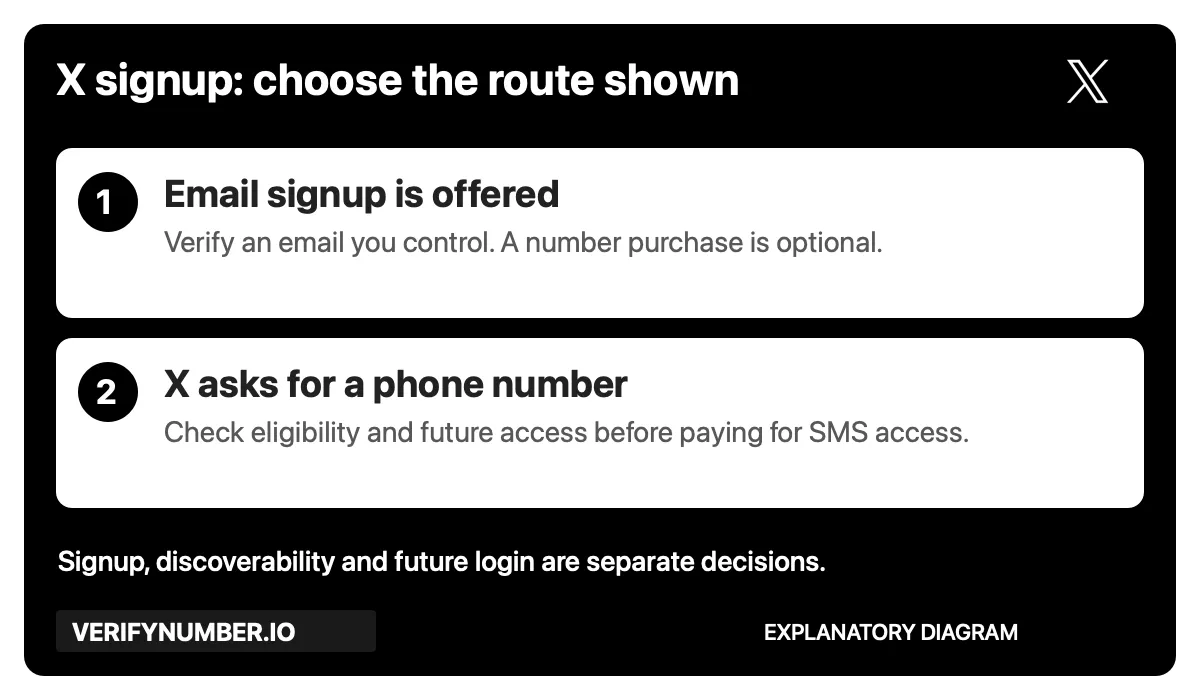
An explanatory diagram, not an X screen. Follow the route X actually presents, then plan privacy and future access separately.
For example, someone setting up a public portfolio might need only an email address they maintain and careful discoverability settings. Someone who encounters a phone prompt has an additional decision: whether the proposed number meets that prompt and will remain available when needed. Do not buy first and treat eligibility as an afterthought.
Steps 1–3 below explain the optional VerifyNumber route. If email signup meets your needs, skip to Step 4. The screenshots show current product controls; they do not demonstrate a completed X registration.
Step 1: Access Your VerifyNumber Account, If Needed
Open VerifyNumber and follow its account-access instructions. Existing users can sign in and use New Verification to review a rental. My Numbers is the entry point for numbers already rented.
Current VerifyNumber navigation, captured October 26, 2026. Account details are outside this crop.
Before ordering, identify the actual task on your X screen. An email confirmation, an SMS request and an account restriction require different responses. A number rental only provides the stated SMS-access service; it does not resolve an unrelated X account decision.
Step 2: Review the Cost and Your Wallet
Look at the rental duration and charge before adding funds. The current app and VerifyNumber Support explain that the rental is paid from your wallet before a number is assigned. If your existing balance is sufficient, you may not need another top-up.

The current wallet entry point, captured October 26, 2026. This is not a checkout receipt or a minimum-deposit claim.
Use Top up wallet only after reviewing the displayed amount and payment conditions. Read the current terms and ask Support about any unclear charge or credit condition before paying. Do not budget on the assumption that a rejected number will automatically be refunded.
Step 3: Choose a Rental Duration and Get a Number
Under New Verification, the app shows Choose how long you need it, with 10 minutes and 1 month options. There is no service search or X-specific selection. During an active rental, SMS sent to that number can appear in your account, regardless of which app initiated the message. The sending platform still decides whether it accepts the number.
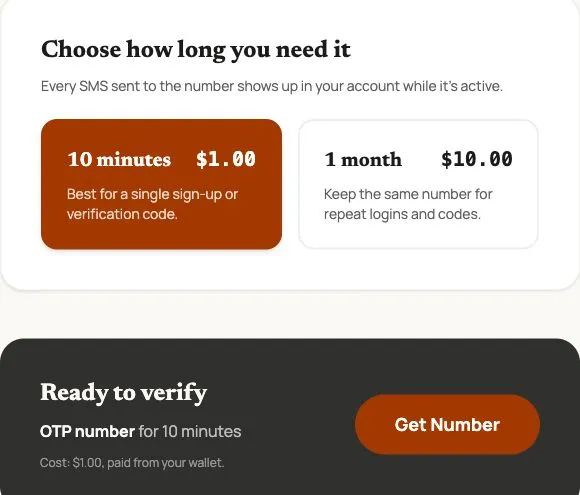
Actual VerifyNumber controls captured October 26, 2026. Prices are dated examples; check the live charge. This screen is not evidence of X acceptance or message delivery.
Choose the duration, review Ready to verify, and select Get Number when you are ready to start the paid rental. After assignment, check the complete number, country code and expiry before entering anything into X. Keep the rental accessible while you follow the SMS prompt.
A month gives a different access window from ten minutes, but neither is permanent ownership. If the profile matters for ongoing work or personal communication, prioritize a number arrangement you can maintain. Check retention and extension conditions rather than assuming you can retrieve the same number later.
For more on evaluating an offer, read eSIM vs VoIP for SMS verification. A technology label alone does not settle eligibility or future access.
Step 4: Create Your X Account With the Offered Method
Use the official X app or the X signup page. X’s signup instructions describe registering with email or a phone number. If email is offered and fits your goal, enter an address you control and complete its confirmation. Follow the remaining profile prompts using accurate information.
If you choose phone signup, enter the complete number with the correct country code and follow the SMS confirmation prompt. If you are using a suitable active rental, retrieve the received message from that rental and enter the code only into the X flow you initiated. Do not share the code with another person or paste it into a support message.
X also explains that it may request additional information during signup or login. Email signup is therefore a starting route, not a promise that you will never need a phone number. Follow the actual request and use X Support when you cannot satisfy it.
If Verification Stops
Read the error before requesting another code. A rejected number is different from an accepted request with no incoming SMS, and both differ from a code that arrives too late. Recheck the digits and rental expiry, follow any waiting instruction X displays, and avoid rapid repeated requests.
Our SMS code troubleshooting article explains those branches. VerifyNumber can investigate a rental or missing message; X controls its registration and account checks. Do not purchase more numbers simply to work around a restriction.
Step 5: Review Email and Phone Discoverability
After signup, open Settings and privacy, then Privacy and safety, and look for Discoverability and contacts. Review whether people may find you through your email address or phone number. If you do not want that kind of matching, turn off the corresponding options.
X’s discoverability guidance distinguishes contact matching from public display: your email and phone number are not publicly displayed through these settings, but they can help connect your account with uploaded contacts when discovery is enabled.
This matters even with email-only signup. Using an inbox that your acquaintances already have may connect your profile with those contacts if you permit it. Review each account’s choices rather than assuming that a new handle or separate number takes care of privacy for you.
Also consider the identifying information you put in your public bio, posts, images and profile links. Contact settings cannot undo details you intentionally publish.
Step 6: Prepare for Your Next Login
Keep your signup inbox accessible and use a unique password. In Settings and privacy → Security and account access → Security → Two-factor authentication, review the methods X offers. Its two-factor authentication documentation covers authentication apps and security keys as well as text messages. SMS-based two-factor authentication is limited to Premium subscribers, with availability depending on country and carrier.
Follow the enrollment instructions, confirm the associated email when asked, and store any recovery information securely. An authentication app or security key can reduce reliance on receiving a text for routine two-factor login. It does not guarantee that X will never request another account check.
Before giving up access to a number attached to X, review your account contact details and the supported update process while you can still sign in. A saved browser session is not a recovery plan. For an account you intend to keep, plan for a lost device, a forgotten password and a future verification request separately from today’s signup.
VerifyNumber Compared With Free X Signup Options
| Option | When it may fit | What still needs attention |
|---|---|---|
| Email signup offered by X | You want to begin without adding your main number | Maintain the inbox and complete any later verification request |
| X discoverability settings | You want more control over contact-based suggestions | These settings do not replace signup or account-security checks |
| A secondary mobile number you retain | You need a separate contact method for an ongoing account | Check its receiving capabilities and keep the line active |
| VerifyNumber SMS rental | You have assessed a time-limited SMS task and the number’s suitability | Review duration, expiry and X acceptance; future access is finite |
| A public SMS inbox | It may appear convenient because no account is needed to read messages | Publicly visible codes are unsuitable for private account access |
Paid access is not automatically the best choice. Use the email route when it meets your needs, and treat a rental as a specific access arrangement rather than a substitute for privacy settings or long-term control.
Additional Benefits of Using VerifyNumber for X
Review the access window before ordering. The duration selector helps you compare a short task with longer access. Choose based on what you need to receive, not a promise that X will approve the number.
See the charge before starting. The app shows the rental cost and wallet entry point so you can assess the purchase before assignment. Keep payment questions separate from X verification questions.
Use one rental flow without searching a service list. The current interface does not require finding an X catalog entry. That simplifies the ordering decision while leaving platform eligibility to X.
Wrapping Up
For an X account without your personal phone number, begin with the email option when available. If you need separate SMS access, assess the number and rental duration before spending, then complete X’s displayed verification. Review discoverability and future login arrangements before relying on the profile.
Need to assess separate SMS access? Review the current options on VerifyNumber. Check the duration, charge and suitability for your task before starting a rental.
Need more help? Visit VerifyNumber Support or email support@verifynumber.io. If something goes wrong with your rental, our team will review the issue and help you work through the next steps. Include the rental ID and relevant error, never your password or verification code.