How to Set Up an Instagram Account Without Your Personal Phone Number
Create an Instagram account with email first. Explore optional VerifyNumber setup, SMS checks and recovery planning without using your personal phone number.
You can start Instagram signup with an email address instead of your personal phone number. Instagram’s web signup form offers both options. Begin with an inbox you control; you may not need to buy a number at all.
If your signup flow asks for SMS verification, a separate number is another option to assess. Check its availability, permitted use and access period before paying. Receiving one code does not give you permanent control of that number or guarantee that Instagram will accept it.
TL;DR
- Try email first. If Instagram lets you continue with email, skip the VerifyNumber setup in Steps 1–3.
- If you need a separate number, open your VerifyNumber account, fund it only when needed, and choose a rental duration in New Verification.
- Confirm the current offer and number-access terms before requesting an Instagram code. Acceptance and delivery are not assured.
- Keep an accessible recovery email and enable two-factor authentication. Do not make a temporary number your only way back into an account you value.
Why Create an Instagram Account Without Your Personal Number?
A photography portfolio, hobby page or creator account may deserve its own contact details. Starting with a dedicated email address lets you organize that account separately from the phone number you use for personal calls. For this goal, email is the first option to try.
A separate number can be useful when a phone verification step appears, but it solves a narrower problem: which number you submit. It does not make your account anonymous. Instagram’s developer-provided App Store privacy disclosures describe other categories of data associated with using the app.
Decide how important the account will be before choosing a temporary number. A page you plan to grow for years needs a durable recovery plan. If you cannot confirm future access to a number, do not assume that today’s SMS session will be available at your next login.
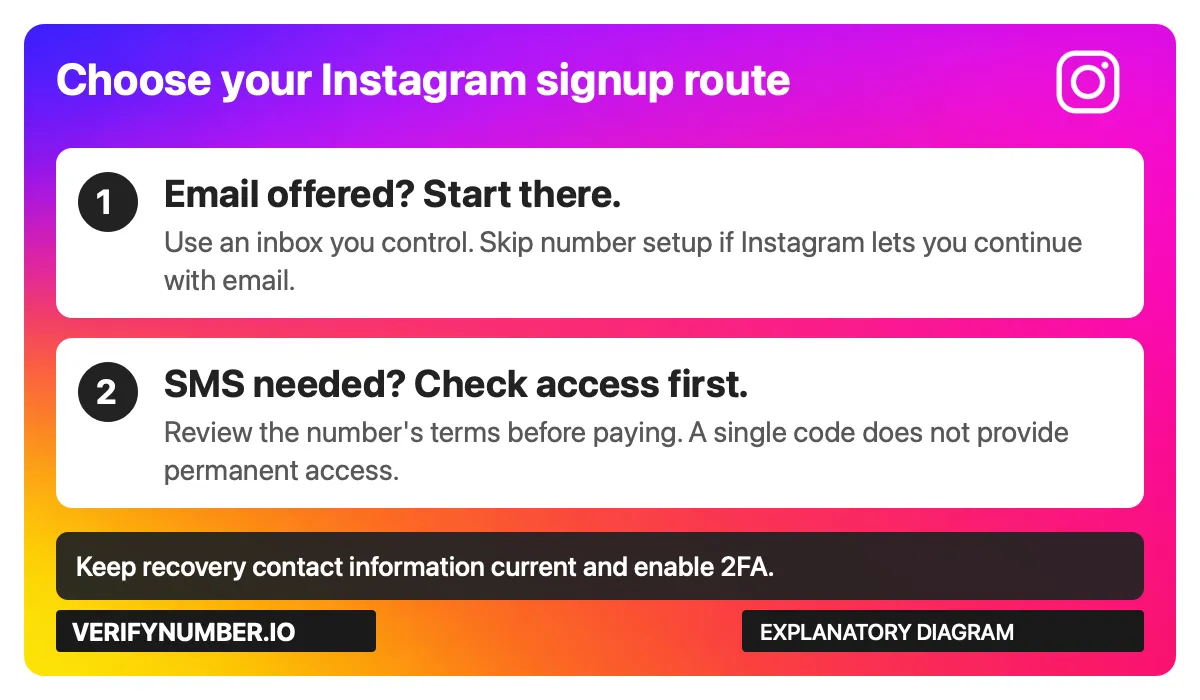
Choose the route before spending money. This is an explanatory diagram, not an Instagram screen.
Using email? Go directly to Step 4. Steps 1–3 cover the optional VerifyNumber route. Existing VerifyNumber users can skip account setup they have already completed.
Step 1: Open Your VerifyNumber Account, If Needed
Open VerifyNumber and sign in to your own account. If you are new, follow the account-access instructions shown. Existing users can skip completed setup. These steps are optional if Instagram offers a suitable route that does not require another number, or you already have a number you can keep.
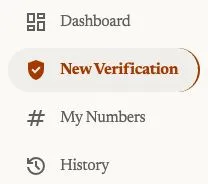
Current account navigation, captured October 23, 2026. Open New Verification to review a rental; My Numbers is the entry point for your rented numbers.
Step 2: Review the Rental Cost and Your Wallet
Review the rental duration and price before adding money. Rentals are paid from your wallet before a number is assigned, as explained on VerifyNumber Support. If your balance is insufficient, use Top up wallet and check the amount and payment terms displayed. An existing balance may already cover the rental.

Current wallet entry point, captured October 23, 2026. This crop does not show a payment or establish a minimum deposit.
Confirm the current fees and credits terms before paying. A rental fee does not guarantee that Instagram will accept the assigned number or send a code.
Step 3: Choose a Duration and Get Your Number
Open New Verification. Under Choose how long you need it, review the 10 minutes and 1 month options. The current flow does not ask you to select Instagram or any other service. One active rental can receive SMS sent to its number from different apps and websites during its access window.
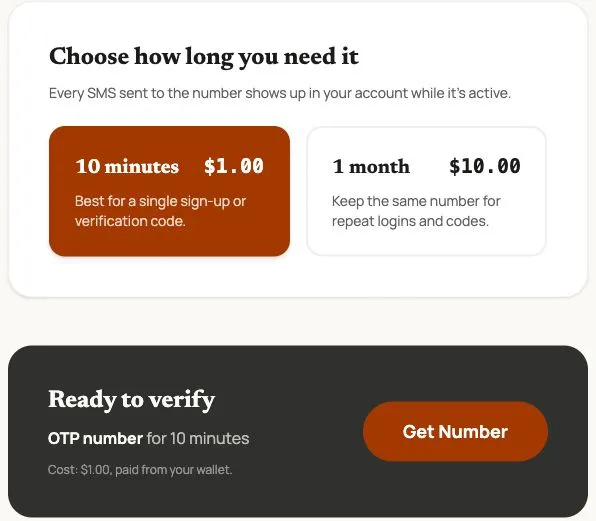
Actual VerifyNumber screen captured October 23, 2026. Prices are dated examples; review the live charge. This is a rental-selection screen, not proof of Instagram acceptance or SMS delivery.
Choose the duration that fits your task, review Ready to verify, and use Get Number only when ready to start the paid rental. After assignment, check the complete number, country code and expiry, and keep the rental accessible while following Instagram’s verification prompts.
No service selection does not mean universal acceptance. Instagram controls its number requirements and account checks. A month-long rental is still time-limited; confirm extension and retention conditions before relying on it for later logins. For a lasting account, prioritize continuing control of its contact methods.
Step 4: Start Instagram Signup With Your Chosen Contact Method
Open Instagram’s official signup page or its official app. On the web form reviewed for this guide, the contact field is labeled Mobile number or email address. The form also asks for a password, date of birth, name and username. The app’s presentation may differ.
For the email route: enter an email address you control, complete the requested details and follow Instagram’s confirmation prompts. If email is sufficient for your signup, there is no number-purchase step to complete.
For the number route: use the number assigned to your own session and check the country code carefully. Follow Instagram’s displayed verification instructions. If an SMS arrives in your provider session, enter that code only into the Instagram flow you initiated.
Read the terms shown before submitting signup. If Instagram presents an additional check, follow its instructions. An email option on the opening form is not a promise that every account will complete signup without another verification step.
If the Code Does Not Arrive
Check for a typo or country-code mismatch and confirm that the rental is still active and the entered number matches it. Follow any wait period shown by Instagram or the provider before requesting another message. Review the current session status and support instructions instead of repeatedly buying more numbers.
If Instagram rejects the number, stop and reassess the available signup or support options. A paid rental does not establish acceptance for your particular account.
Step 5: Protect Access Before You Start Building the Account
Once you are in, review the account’s contact information while you still have access. Keep the email address current and verify any changes through Instagram’s prompts. Meta’s Instagram security guidance recommends maintaining recovery contact information and reviewing login activity.
Enable two-factor authentication using the options available in your account. Meta’s account-security guidance includes authenticator apps as a 2FA option. If you choose that method, keep access to the authenticator and store any recovery codes Instagram provides somewhere secure.
2FA helps protect login; it does not establish permanent ownership of a temporary phone number. If the number will expire, review Instagram’s contact settings before losing access and follow the available process to keep your details current. Recovery options can depend on the account’s circumstances.
For other accounts you are setting up, see our Gmail signup guide and Signal setup guide. Each platform has its own signup and recovery requirements.
VerifyNumber Compared With Free Instagram Signup Options
Choose based on control of the contact method and the account’s future importance, as well as the immediate cost.
| Option | When to consider it | What to check |
|---|---|---|
| Email you control | Your Instagram signup flow accepts email | Keep the inbox accessible and follow any later checks. No SMS purchase is needed for an email-only flow. |
| Free public SMS inbox | Understanding how public SMS reception works | Anyone able to open that inbox may read its messages. Avoid it for an account you intend to keep. |
| VerifyNumber session | You need a separate number and the rental duration fits your use | Review price, access period and support terms. One delivered code is not permanent number control. |
| Separate number you maintain | The account needs ongoing access to the same number | Check the provider’s continuing costs and retention conditions. Acceptance still depends on Instagram. |
Free email signup and a public SMS inbox are very different choices. An inbox under your own control can support ongoing account access. A public SMS page exposes messages to other visitors; being free does not make that exposure a good trade for a personal or creator account.
Additional Benefits of Using VerifyNumber for Instagram
One rental flow across apps. Choose a duration without selecting Instagram from a catalog. Messages sent to the assigned number appear while the rental is active; Instagram still decides whether to accept it.
Account and wallet controls in one workflow. The current account navigation and Top up wallet controls provide a clear setup path for readers who decide they need the number route.
Separation from your everyday number. Using a different number lets you avoid submitting your personal number in that step. The benefit depends on the offer fitting your use and Instagram accepting it; it does not remove Instagram’s other account checks or data collection.
These are practical workflow benefits, not a claim that you must pay to join Instagram. Start with email when it meets your needs, and keep future account access part of the decision.
Wrapping Up
Start with an email address you control. If your Instagram flow needs SMS, review the number’s terms before committing to a paid session, then protect the account with current recovery information and 2FA.
Need a separate number for the next step? Visit VerifyNumber.io to review current rental durations, pricing and number-access terms. Choose an offer only when it fits the way you plan to use and maintain the account.
Need more help? Visit VerifyNumber Support or email support@verifynumber.io. If something goes wrong with your rental, our team will review the issue and help you work through the next steps. Share the rental ID and relevant error, never your password or verification code.