Temporary Phone Number for Doublelist in 2026
Review temporary number access for Doublelist, follow the current VerifyNumber rental flow, and check verification limits, expiry and support before you pay.
A temporary phone number may keep your everyday number out of a signup form, but it does not guarantee Doublelist verification or future account access. Before buying, follow Doublelist’s current requirements and decide whether a time-limited rental fits the account you intend to use.
VerifyNumber now offers duration-based rentals without a Doublelist service selector. The same active number can receive SMS from different apps and websites. Doublelist still controls whether it accepts a number and sends a verification message.
TL;DR
- Follow Doublelist’s current signup and verification prompts; a paid number is not guaranteed acceptance.
- In VerifyNumber, review your wallet, choose a rental duration and use Get Number. There is no Doublelist service picker.
- Check expiry and future-access conditions before attaching an account to a rented number.
- Contact the relevant support team if verification fails. Do not open replacement accounts to evade an account restriction.
Why Keep Your Personal Number Separate?
You may want distinct contact details for different parts of your online life. A separate number can serve that purpose at the verification step, but it does not make an account anonymous or remove the platform’s rules.
Consider the account’s expected lifetime. A brief rental may end before a later verification request, while a secondary mobile line you maintain can offer continuing access under its plan terms. The right comparison includes control of the number, not only its initial cost.
This guide does not claim to know Doublelist’s private detection systems, publish a measured acceptance rate, or certify that every temporary number is permitted. Use the official Doublelist Help Center for current account requirements.
Step 1: Open Your VerifyNumber Account, If Needed
Open VerifyNumber and sign in to your own account. If you are new, follow the account-access instructions shown. Existing users can skip completed setup. These steps are optional if Doublelist offers a suitable route that does not require another number, or you already have a number you can keep.
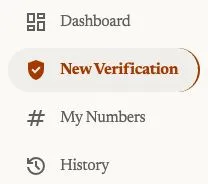
Current account navigation, captured October 23, 2026. Open New Verification to review a rental; My Numbers is the entry point for your rented numbers.
Step 2: Review the Rental Cost and Your Wallet
Review the rental duration and price before adding money. Rentals are paid from your wallet before a number is assigned, as explained on VerifyNumber Support. If your balance is insufficient, use Top up wallet and check the amount and payment terms displayed. An existing balance may already cover the rental.

Current wallet entry point, captured October 23, 2026. This crop does not show a payment or establish a minimum deposit.
Confirm the current fees and credits terms before paying. A rental fee does not guarantee that Doublelist will accept the assigned number or send a code.
Step 3: Choose a Duration and Get Your Number
Open New Verification. Under Choose how long you need it, review the 10 minutes and 1 month options. The current flow does not ask you to select Doublelist or any other service. One active rental can receive SMS sent to its number from different apps and websites during its access window.
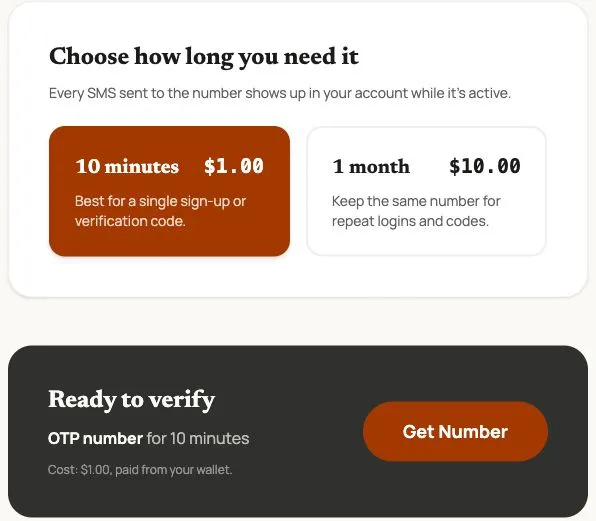
Actual VerifyNumber screen captured October 23, 2026. Prices are dated examples; review the live charge. This is a rental-selection screen, not proof of Doublelist acceptance or SMS delivery.
Choose the duration that fits your task, review Ready to verify, and use Get Number only when ready to start the paid rental. After assignment, check the complete number, country code and expiry, and keep the rental accessible while following Doublelist’s verification prompts.
No service selection does not mean universal acceptance. Doublelist controls its number requirements and account checks. A month-long rental is still time-limited; confirm extension and retention conditions before relying on it for later logins. For a lasting account, prioritize continuing control of its contact methods.
Step 4: Follow Doublelist’s Current Verification Prompt
Open Doublelist through its official site and follow the signup instructions shown to you. If it asks for a phone number, check that your proposed number meets the displayed requirements before requesting a code. Enter the complete digits and country code carefully.
If a verification message reaches your active rental, enter the code only in the Doublelist flow you started. Keep both the message and your account credentials private. A message received by VerifyNumber does not prove that every remaining signup check is complete.
If the number is rejected or the code does not arrive, note the exact error and check the rental status. Doublelist’s phone-verification help directs users with verification issues to its customer support. Use that official route for a platform-side problem.
For a rental or charge issue, contact VerifyNumber Support with the rental ID and time. Our SMS troubleshooting guide explains why a rejected number and a delayed SMS need different checks. Do not keep purchasing numbers without understanding the failure.
Step 5: Plan Future Account Access
Keep the email associated with the account accessible and secure. Review the contact-update and recovery options actually available in your account while you can still sign in. Do not assume that a number will remain yours after the rental expires or that a new rental returns the same digits.
If a restriction or account hold appears, use Doublelist’s official help process. A new phone number is not a substitute for resolving an account issue. VerifyNumber can investigate its rental service but cannot remove a Doublelist restriction or recover a Doublelist account.
Free Inboxes and Paid Number Access Compared
| Option | Useful consideration | What to check |
|---|---|---|
| Secondary line you already control | Continuing access may suit a lasting account | Current platform eligibility and plan terms |
| A new mobile plan | Can separate personal and account contact details | SMS capability, ongoing cost and retention |
| VerifyNumber rental | Choose a finite access period without a service picker | Live price, expiry, platform acceptance and recovery plan |
| Public SMS inbox | Other visitors may see the same messages | Exposure of codes and lack of lasting control |
Paying for access does not make a number permanent, and free access does not make a public inbox private. See our number-type comparison for the distinction between eSIM technology, SMS capability and acceptance.
What VerifyNumber Helps You Check
Duration before purchase. Compare the displayed 10-minute and one-month options with the time you actually need.
Messages in your account. Monitor messages sent to the assigned number while its rental is active. The destination still decides whether to send them.
A support route. Keep the rental ID and relevant error so the team can review a rental-side issue. No acceptance percentage or automatic refund is promised here.
Wrapping Up
Choose a number-access arrangement only after checking Doublelist’s requirements and the account’s future needs. Keep verification codes private and use the appropriate support route if the process fails.
Considering temporary SMS access? Open VerifyNumber to review the current duration choices and charge. There is no Doublelist-specific purchase step; eligibility remains a separate platform decision.
Need more help? Visit VerifyNumber Support or email support@verifynumber.io. If something goes wrong with your rental, our team will review the issue and help you work through the next steps. Share the rental ID and relevant error, never your password or verification code.